
Lakewood Arrest Records and P2C
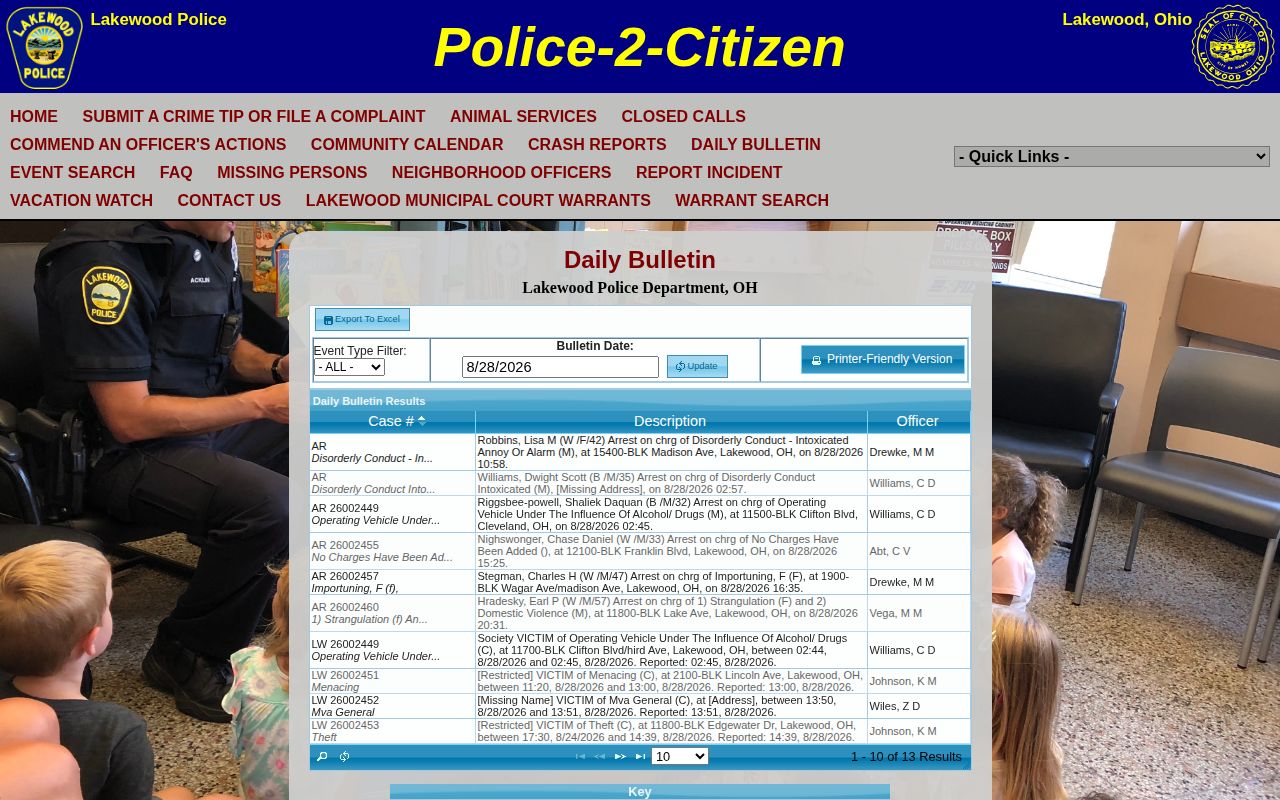
Lakewood Police runs a Police-2-Citizen portal, called P2C, that puts city event data within easier reach than many neighboring towns offer. The Daily Bulletin lets you pick a bulletin date, filter by event type, and export results to Excel. An entry tagged AR means an arrest. Keep in mind this is a city resource, not a Cuyahoga County Corrections Center roster.
That difference matters more than it sounds. An AR entry proves an arrest event was logged, not that the person sat in county custody or had a booking photo taken. Lakewood Police owns the incident record. The county Sheriff's app only becomes relevant after a transfer to county custody. When you cannot tell where someone was booked, ask the arresting agency instead of treating a city result as a jail answer.
Lakewood counted 50,942 residents in the 2020 Census, and its public police channels cover the P2C portal, records contacts, and the Daily Bulletin. Useful as that is, limits remain. A short bulletin line can name an event while leaving out the full report, the current jail status, photo availability, or what a court later decided.
Where Lakewood Busted Mugshots Appear
An official daily bulletin exists, but it is not a photo feed. The bulletin itself notes that some events show up late, and nothing in it promises a booking photograph for every arrest. The sensible order: find the incident in the bulletin, ask Lakewood Records about a report or photo the city holds, then turn to county custody only after confirming a transfer to the Cuyahoga County Corrections Center.
| Channel | Photo or record | Status | Best use |
|---|---|---|---|
| Lakewood P2C Daily Bulletin | Date-filtered city events, including AR arrests | Official | Find an incident date and event record. It is not a county jail roster. |
| Lakewood Police | City reports and records-request contacts | Official | Request an arrest report or a city-held photo after identifying the event. |
| Cuyahoga Sheriff app: iOS / Android | Current county custody, photo reported at app launch | Official | Use only if the person entered Cuyahoga County custody. |
| Cuyahoga criminal docket | Case status and disposition | Official | Follow the record after booking or charging. |
| Busted Newspaper Lakewood tag | Reported city-tagged entries and images | Unofficial | Use only as a lead, because entries can be stale and do not prove present custody. |
Local TV covers the county's public-safety beat too. Cleveland 19 and News 5 Cleveland both publish crime stories, some touching on Lakewood. Neither runs a full booking feed, though. Photos and sourcing differ story by story, so weigh any news account against the police record and the court docket.
Finding a Lakewood Busted Report
A practical search starts with the event, not with an assumed jail stay. The city's Police-2-Citizen record answers what Lakewood logged. The Sheriff's app answers a different question about current custody. For the wider county picture, the Cuyahoga County booking and custody reference pulls together the roster, request, and court paths in one place.
- Open the P2C Daily Bulletin and search the relevant Bulletin Date. Filter to arrest case type
ARwhen that matches the event being checked. - Record the date, event details, and any report information, then contact Lakewood Records for the arrest report or a city-held photo request.
- Confirm whether the person was transferred to Cuyahoga County custody before using the Sheriff app. The app is not a complete list of every Lakewood arrest.
- Search the criminal docket for the later case record. A docket result can show a different stage from an incident bulletin or booking entry.
Timing trips people up here. A bulletin date is not a jail entry time, and a jail entry time is not the arrest moment. Treat anything the county app displays as current-custody data and read its live fields rather than relying on memory. For state prison or supervision records, the ODRC offender search is the right tool, and it replaces neither Lakewood P2C nor the county custody app.
Lakewood Busted Records Requests
Lakewood Police takes records requests by email, mail, fax, phone, or in person at the front counter. Email the Records unit at police.records@lakewoodoh.gov. Include the date, the name, a report number if you have one, and a plain description of the report or image you want. The department says reports are usually ready about three days after the incident information comes in, though complex requests can take longer.
Lakewood Police Records
12650 Detroit Avenue
Lakewood, OH 44107
Records: 216-529-6785
Fax: 216-521-7727
Email: police.records@lakewoodoh.gov. Requests are also accepted by mail, telephone, and at the front counter.
Cuyahoga County Sheriff’s Department
1215 West 3rd Street
Cleveland, OH 44113
Records/Warrant Division: 216-443-6100
Once a transfer to county custody is confirmed, this is the contact for Sheriff-held or county-corrections records.
Lakewood keeps this easy. Inspection needs no written request. You don't need ID or a reason. No booking-photo fee is posted either. Ask Records about the current charge before assuming anything, and confirm an image is even held. For older county bookings, use the county's own public-record request page.
Lakewood Busted Bulletin Dates
The Daily Bulletin earns its keep. You can search across dates and export results. Immediate publication is not guaranteed, though. Lakewood warns that some events appear a day or more later. A missing result might mean the event has not been entered yet, that your date range is off, or that another agency holds the record. It does not mean nothing happened.
County booking runs on its own clock. Cuyahoga County takes drop-offs and pick-ups from 6:00 a.m. to 6:00 p.m. County-warrant prisoners are accepted at any hour. None of that says when a roster result or photo appears. The county describes daily rosters in its app, and launch coverage mentioned hourly updates. Still, the live app is the only source worth trusting on timing.
Note: A Lakewood bulletin entry can lag the event, while a county-custody record depends on transfer, intake, and what the app currently shows.
Lakewood Busted Bulletin Search Fields
The Daily Bulletin's filters are what turn a raw event list into a workable search. Pick a Bulletin Date first. Add the event type when you need to narrow things down, and watch for the AR label, which marks arrests. There is also an Excel export. Grabbing that export saves the details you will want later for a records request: the date, the event classification, and whatever report information the entry carries.
Read the results with care, though. A case type is not a court charge, and an event date may not match a jail-entry time. The bulletin itself warns that some events get reported days after they happen. So when the exact date is fuzzy, widen your search to the surrounding days. Leave the official report request to Lakewood Records.
Once you have pinned down a city event, ask Records for the full report instead of guessing from a short bulletin label. A confirmed county transfer points you to the Sheriff app for current custody status. If the arrest became a court case, the docket carries what happened next. Each channel answers a different question.
Lakewood Arrest Bulletin, Not Photo Feed
Lakewood shows exactly why an arrest log and a photo publication practice are two different things. A February 2026 Cleveland Scene report said the department stopped posting full-body booking photos. A local page had scraped hundreds of the images first. That history does not affect the P2C bulletin, which keeps working as an event log.
So use a dated AR event to identify the record you need. Want a city-held image? Request it directly from Lakewood Records. Do not count on an old photo display still existing. Never assume a P2C arrest entry includes a photograph. The official channel comes first, every time.
Lakewood Court Records After Arrest
Four channels, four stages. Lakewood P2C, Lakewood Police Records, the Sheriff custody app, and the court docket each show a different piece of the picture. An event can appear in the city bulletin yet turn up nothing at the CCCC. A person can drop off the county roster while an arrest report still sits in city files. For the legal path a case later took, the docket is the source.
The Daily Bulletin embedded below is a city incident feed. Its date field and filters help you find an arrest event. It is not a booking-photo gallery. It does not show county custody. Work from the live source, and request the underlying record from the agency that holds it. Lakewood Police P2C Daily Bulletin is the source shown here.
Found an event? Use its date and record details to file a Lakewood records request, then check the court docket for any later official case outcome.